Moz SEO Guide — Drive Organic Traffic to Your Online Store
What Is the Moz SEO Traffic Guide?
This is an 18-page PDF playbook that teaches you how to apply Moz SEO standards to a WooCommerce store — step by step, with no prior SEO experience required. Every chapter follows the same framework used by professional SEO teams worldwide. The guide covers the full organic traffic cycle: finding the right keywords, optimising every product page, building backlinks, and tracking results month by month.
Unlike generic blog posts that scratch the surface, this guide goes deep. You get concrete word counts, character limits, keyword density targets, and a structured 30/60/90-day action plan you can start the same day. It is designed specifically for store owners who sell digital products and want consistent Google rankings without a monthly ad budget.
What Is Inside the Moz SEO Traffic Guide?
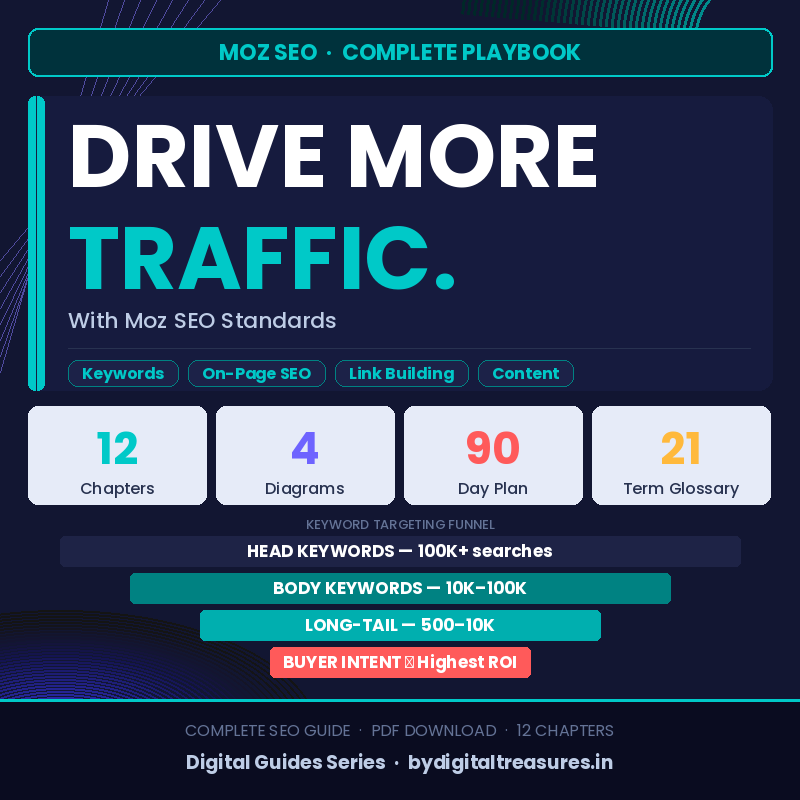
The guide is structured across 12 chapters, four original diagrams, and a 21-term glossary. Each chapter builds on the previous one, taking you from the foundations of SEO all the way through to measuring results and scaling what works. A dedicated 30/60/90-day action plan at the end tells you exactly what to do in each phase.
- Chapter 1 — What Is Moz SEO and Why It Works
- Chapter 2 — Keyword Research: Finding Your Traffic Goldmine
- Chapter 3 — On-Page SEO: Optimising Every Page
- Chapter 4 — Writing Title Tags That Rank and Convert
- Chapter 5 — Meta Descriptions That Drive Clicks
- Chapter 6 — Content Strategy: Depth, Freshness and Intent
- Chapter 7 — Technical SEO Foundations
- Chapter 8 — Link Building and Domain Authority
- Chapter 9 — Social Signals and Off-Page Traffic
- Chapter 10 — Measuring Success With Moz Pro
- Chapter 11 — Quick-Win Action Plan: 30 / 60 / 90 Days
- Chapter 12 — Glossary of Moz SEO Terms (21 definitions)
Keyword Research — Find What Buyers Actually Search For
Chapter 2 breaks down the complete Moz keyword research process, from entering a seed term in Keyword Explorer to mapping clusters to individual product pages. You learn the difference between head keywords, body keywords, long-tail terms, and buyer-intent phrases — and exactly which type to use on each page of your store.
The chapter includes a visual keyword funnel diagram and a step-by-step table walking through all seven stages of keyword selection. A prioritisation matrix helps you choose between quick wins, long-term plays, and terms to skip entirely. By the end of this section, you will have a working keyword map for your top 20 products.
On-Page SEO — Optimise Every Element on Every Page
Chapter 3 covers all 12 on-page elements Moz evaluates, from title tags and meta descriptions to URL slugs, body copy length, image alt text, and Core Web Vitals. A browser mockup diagram labels every element on a real product page so you can see exactly where each signal sits.
The complete on-page checklist table gives you the Moz standard and priority level for each element. You can run through this checklist on every product page in your store and be confident you have covered every ranking factor within your direct control. For WooCommerce stores using Rank Math, the guide maps each item to the corresponding Rank Math field.
You can find a complementary resource on advanced on-page techniques at CorelDRAW Graphics Suite listing — our most fully optimised product page, built using the same framework this guide teaches.
Title Tags and Meta Descriptions — Your Free Ads in Google
Chapters 4 and 5 focus on the two elements that control whether a searcher clicks your result or a competitor’s. The Moz title tag formula is explained with real product examples so you can apply the same structure to your own store immediately. A DO / DON’T comparison table makes the rules clear at a glance.
Meta descriptions get equal attention. You learn the exact formula — primary keyword, concrete benefit, soft call-to-action — and see four real examples across different page types: software product, category, blog post, and homepage. Every example follows the 150-160 character standard and demonstrates how Google bolds the keyword in search results to attract the reader’s eye.
Technical SEO — Build a Foundation Search Engines Can Crawl
Chapter 7 covers the six technical areas Moz audits on every site: crawlability and indexing, Core Web Vitals and page speed, mobile-first standards, HTTPS security, structured data schema, and duplicate content prevention. Each area has a practical bullet-point checklist you can action in your WordPress admin without a developer.
The guide explains exactly which schema types to use for WooCommerce products — Product schema, BreadcrumbList, FAQPage, and VideoObject — and maps each to the corresponding Rank Math Schema tab setting. Core Web Vital targets are stated clearly: LCP under 2.5 seconds, INP under 200ms, CLS under 0.1. You also learn how to use Cloudflare, WP Rocket, and WebP image conversion to hit these targets on a shared hosting plan.
Link Building and Domain Authority — Earn Rankings Long-Term
Chapter 8 explains Moz Domain Authority from 0 to 100 and shows eight ethical link building strategies suitable for a digital software or digital goods store. Each strategy includes how to execute it and the expected DA gain. Strategies range from guest posting and resource page outreach to unlinked brand mention recovery and supplier directory links.
The DA gauge diagram in this chapter makes the benchmark levels easy to understand. A site with DA below 20 should focus entirely on long-tail keywords. At DA 21-40, medium-difficulty terms become reachable. Understanding where your store sits — and what your next milestone is — helps you allocate time to SEO activities that will actually move the needle.
For further reading on domain authority, visit the Moz Domain Authority guide. The Google SEO Starter Guide provides the official search engine perspective on all these principles.
The 30 / 60 / 90 Day Action Plan — A Structured Roadmap
Chapter 11 translates everything in the guide into a phased action plan. Days 1-30 focus on foundation work: keyword research, title tag optimisation, sitemap submission, and schema setup. Days 31-60 move into content creation and authority building through guest posting and internal linking. Days 61-90 cover scaling and optimisation based on real Search Console data.
Every task in the plan is specific and actionable. There are no vague instructions like “improve your SEO.” Each item tells you exactly what to do, which tool to use, and what outcome to expect. By Day 90 you will have a fully optimised site, growing domain authority, and measurable organic traffic you can track in Moz Pro and Google Analytics 4.
Who Is This Guide For?
This guide is written for WooCommerce store owners who sell digital products and want to grow organic traffic without relying on paid advertising. It assumes no prior SEO knowledge — every concept is explained from scratch. If you are already running Rank Math on your site, the guide maps directly to Rank Math fields so you can implement changes immediately.
It is also suitable for freelancers setting up client stores, virtual assistants managing product listings, and anyone who wants to understand the Moz framework well enough to audit their own site. The 21-term glossary at the end of the guide means you will never need to stop reading to look up a definition.
Store owners who want to see these principles applied to a real product page can browse our Graphics and Design category — every listing is built to the same Moz standard this guide teaches.
Complete Workflow Integration
The guide integrates cleanly with the tools most WooCommerce store owners already use. Rank Math SEO fields are referenced by name throughout. Google Search Console steps are explained for sitemap submission, crawl error fixing, and indexing requests. Moz Pro tools — Keyword Explorer, Rank Tracker, and Link Explorer — are covered in detail, with instructions for setting up a campaign from scratch.
For store owners also running Google Ads or Meta catalog campaigns, the guide explains how organic SEO and paid traffic complement each other. Organic rankings reduce cost-per-click over time and protect revenue when ad budgets are paused. Understanding both channels together gives you a more resilient traffic strategy than either approach alone.
Additional tools and resources for WooCommerce SEO can be found at Rank Math’s official setup guide, the Moz Beginner’s Guide to SEO, and the Google Search Central documentation. For technical implementation guidance, the Schema.org Product type documentation covers every structured data field referenced in Chapter 7.
Our complete digital tools collection is available at bydigitaltreasures.in — every product is personally tested before listing, with instant digital delivery to 28+ countries.
Authority Sources and Resources
- Moz — The Beginner’s Guide to SEO
- Google Search Central — SEO Starter Guide
- Moz — Domain Authority Explained
- Rank Math — Official Setup and Usage Guide
- Google Web.dev — Core Web Vitals
- Schema.org — Product Structured Data Reference
Frequently Asked Questions About the Moz SEO Traffic Guide
Q: What is the best SEO guide for WooCommerce store owners with lifetime access?
A: This guide was written specifically for WooCommerce store owners and is available as a one-time PDF download — no subscription, no recurring fee. It covers the complete Moz SEO framework from keyword research through to measuring results, with every step mapped to the tools WooCommerce store owners already use: Rank Math, Google Search Console, and Moz Pro. The 30/60/90-day action plan makes it immediately actionable from the day you download it. Unlike monthly SEO tools, this is a reference you own permanently and can return to at any stage of your store’s growth.
Q: How do I do keyword research for an online store step by step?
A: Chapter 2 of this guide walks through the complete keyword research process in seven steps using Moz Keyword Explorer. You start with a seed keyword, filter by monthly search volume above 500, check keyword difficulty scores, evaluate organic CTR, cluster related terms together, map clusters to specific pages, and analyse the SERP to match the content format that currently ranks. The keyword funnel diagram in the guide shows where head keywords, body keywords, long-tail terms, and buyer-intent phrases sit relative to each other — and which type delivers the highest conversion rate for product pages.
Q: Is there an on-page SEO checklist for product pages in WordPress?
A: Chapter 3 includes a complete 12-point on-page checklist covering every element Moz evaluates, from title tag character counts and H1 heading rules through to URL slug format, body copy word count minimums, keyword density targets, image alt text requirements, internal linking standards, schema markup types, Core Web Vital thresholds, and mobile responsiveness standards. Each item in the checklist maps directly to a Rank Math field so you can work through the list inside your WordPress product editor without switching between tools.
Q: How do I build backlinks and increase domain authority for a new store?
A: Chapter 8 covers eight ethical link building strategies for digital product stores. These include guest posting on tech and software blogs, pitching resource page roundups, recovering unlinked brand mentions using Moz Link Explorer, requesting supplier and partner directory links, issuing milestone press releases, leveraging verified marketplace sales history as a credibility signal in outreach emails, participating genuinely in industry forums, and appearing as a guest on niche podcasts. Each strategy includes expected domain authority gains and practical execution steps. The chapter explains Moz DA benchmarks so you can set realistic monthly targets and track progress.
Q: How long does delivery take?
A: Your PDF setup files are available immediately after payment in My Account → Downloads. No waiting, no approval process. Download the guide the moment your order is confirmed and start applying the action plan the same day.
Q: Which devices and formats is this guide compatible with?
A: The guide is delivered as a standard PDF file compatible with any device that can open a PDF — Windows, Mac, iOS, Android, Kindle, and any web browser. No special software is required beyond a free PDF reader such as Adobe Acrobat Reader or your device’s built-in PDF viewer. The guide is formatted for both screen reading and printing at A4 size.
Q: What is your refund policy?
A: Full details are available at bydigitaltreasures.in/refund-policy. We stand behind every product we sell and want every customer to be completely satisfied with their purchase.
Q: Is this a genuine Moz SEO guide?
A: Yes — every product on ByDigitalTreasures.in is personally tested by our team before listing. Moz SEO Guide only.We stand behind every product we sell.
Digital delivery only — no physical disc or box included.
✅ Genuine Lifetime Activation — No monthly fees
✅ Works on All Devices — Windows, Mac, iOS, Android
✅ 24/7 Support via Telegram: t.me/ByDigitalTreasuresHelp
⚡ Instant Digital Delivery — PDF in My Account → Downloads after payment
💳 One-time payment — own it forever, no subscriptions
Trusted by customers in 28+ countries | 360+ verified Etsy sales | 4.5★ rated
Visit: bydigitaltreasures.in
Reviews
There are no reviews yet.